-p6UL3AcG.jpg?q=100&w=96&s=21743aa08ba81fd0b19a43425cbe9ee8)
MD Shahariar Jaman Siam
-p6UL3AcG.jpg?q=100&w=70&s=e1e40ff373cde0719d253e4c908ba38b)
MD Shahariar Jaman Siam
@sjsiam
MD Shahariar Jaman Siam is the CEO and the founder of Fileion.Com & NearFile.Com.
MD Shahariar Jaman Siam is the CEO and the founder of Fileion.Com & NearFile.Com.
Answered 2 years ago by SJ Siam on Can I transfer data between different iOS devices?
Yes! FoneTool facilitates seamless data transfer between iPhones, iPads, and iPod touches, regardless of their iOS version. You can even transfer data directly to your computer for safekeeping.
-p6UL3AcG.jpg?q=100&w=72&s=f11c6c2a3055e52e6c4c9e8cd27be3e6)
Answered 2 years ago by SJ Siam on How does IDM increase download speeds?
IDM utilizes advanced segmentation and multi-threaded downloading technology, splitting files into smaller parts and downloading them simultaneously through multiple connections.
Answered 2 years ago by SJ Siam on Who is the provider of WinRock - Geochem software??
WinRock is a software program developed by David R. Albin of A.A. Editores de Livros Ltda. It is a petrology/geochemistry program for Windows that allows users to plot data in ternary diagrams.
Answered 2 years ago by SJ Siam on Where can I download mustafa game?
You can download Mustafa Game for PC (from your given tags I assumed that you want to download it for PC): https://mustafa-game.fileion.com/windows/download
Answered 2 years ago by SJ Siam on How to disable prediction in Google Chrome?
To disable prediction in Google Chrome and prevent the browser from showing previously visited sites as suggestions while typing, you can follow these steps:
- Open Google Chrome.
- Click on the three-dot menu icon in the top-right corner of the browser window.
- Select "Settings" from the dropdown menu.
- Scroll down and click on "Privacy and security" in the left sidebar.
- Under the "Privacy and Security" section, click on "Clear browsing data."
- In the "Basic" tab, select "Browsing history" and ensure that it's checked.
- Optionally, you can also select other items to clear, such as cookies, cached images and files, etc., for better privacy.
- Choose a time range (e.g., "Last hour," "Last 24 hours," "Last 7 days," etc.) or select "All time" to clear all browsing data.
- Click on the "Clear data" button to confirm and clear your browsing history.
After completing these steps, Chrome won't suggest previously visited sites as you type in the address bar. However, keep in mind that clearing your browsing history will remove all history data, including saved passwords (if you choose to clear them), so make sure you're comfortable with that before proceeding.
Answered 2 years ago by SJ Siam on Can I set custom screen resolution for my desktop device?
There are no options on Windows 10 that will allow you to add custom resolution. However, third-party software, like Custom Resolution Utility, may help you to do that.
Here is the step-by-step way to achieve custom resolution:
- First download the custom resolution utility: https://custom-resolution-utility.fileion.com/windows/download
- After completing the download, you will get a zip file. Extract it.
- Now run the CRU.exe file from the extracted folder. (You may get a UAC warning. Click on "Yes" to run the program)
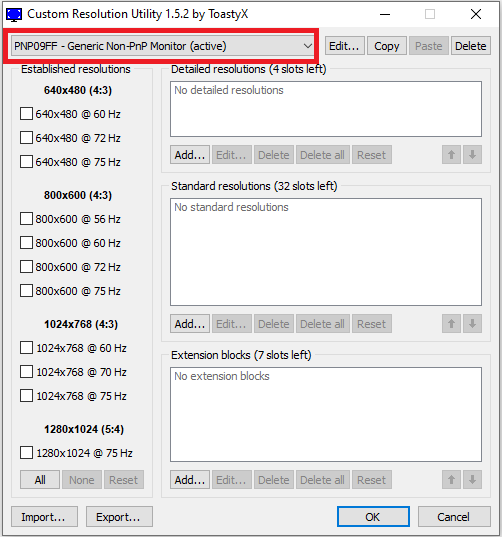
- If you have multiple monitors, select the monitor for which you want to change the resolution from the top bar.
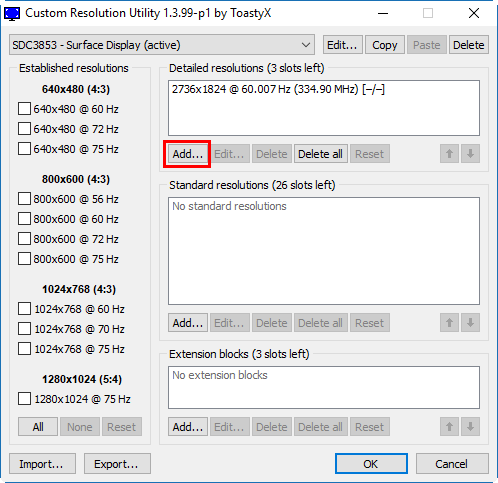
- Now click on the "Add..." button from the Detailed Resolutions section.
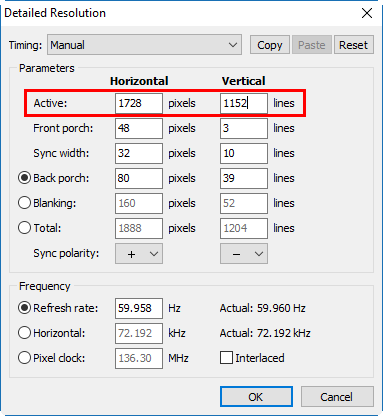
- A new window will pop up. From there you can manually add a new custom resolution for your PC. You must make sure that your provided values for the resolution are correct and also compatible with your monitor.
- (Recommended): I recommend you choose one of the pre-build resolutions from the Standard resolutions section.
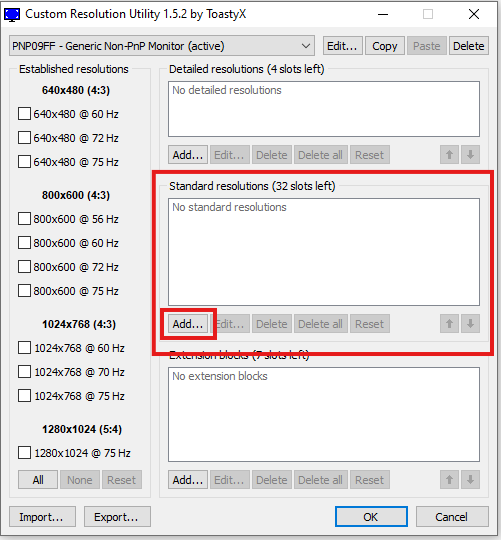
- Make sure to choose the correct one that will support your monitor. In my case, only the 4:3 and 16:9 configured resolutions worked for my monitor.
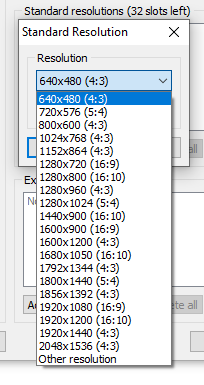
- Now click on OK to confirm the selection.
- Make sure to choose the correct one that will support your monitor. In my case, only the 4:3 and 16:9 configured resolutions worked for my monitor.
- After you have done everything, click on "OK" to confirm all configurations.
- Now run the "restart.exe" (for 32-bit PC) or "restart64.exe" (for 64-bit PC).
- Now wait until you see a window like the one below:
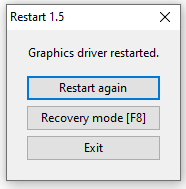
- Click on Exit and proceed to the next step.
- Now open your Display Settings by right-clicking on the mouse on the Desktop and check if your custom resolution is available in the Resolution section.
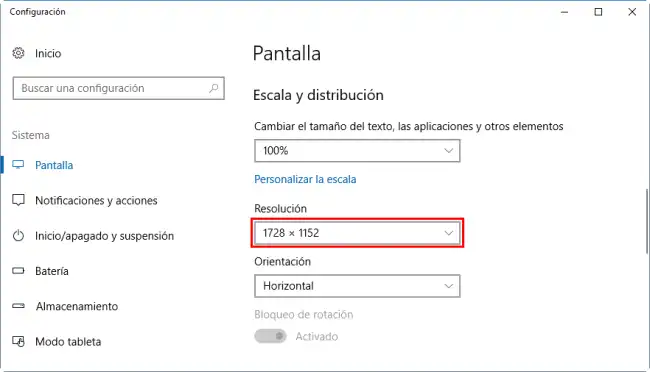
That's all. Now you can use your customly added resolution whenever you want from the Display Settings.
[Note:] Sometimes your added custom resolution may not show on the Display Settings. It may be caused by many reasons. Here are some of them:
- Your given resolution isn't supported by your Monitor or Graphics Card.
- You have provided the wrong values while using the Manual resolution settings.
- Your given resolution doesn't make any sense to the system, so it got ignored.
Answered 2 years ago by SJ Siam on Where can I download ReShade old versions?
You can download old versions of ReShade from here: https://reshade.fileion.com/windows/versions
Just click on the version which you want to download. Then it will take you to the download page for that version. At last, click on the download to download it.
And as for the 4.9.1 version of ReShade, you can download it from here: https://reshade.fileion.com/windows/version/4.9.1/download
Answered 2 years ago by SJ Siam on I unblocked someone on Snapchat but I can't find them. Why?
The reason why you can't find your friend on Snapchat is most probably because your friend may have also blocked you. You can create a new Snapchat account to connect with your friend and tell him to unblock you. Also, you can go to meet with him and do the same.
Wilda R. Elliott